
Trade Quote Automation: Can It Send Quotes by Itself? Three Checks a Human Must Keep
Quote automation software is solid for drafting quotes, but not for sending them on its own. This article covers what automation can take over, the three checks a human must keep, and a safe rollout order.
Short answer: automation can draft the quote, but it should not send it
Many teams ask: can trade quote automation software take an inquiry and send the quote on its own? The answer: using it to draft quotes is solid; using it to send quotes automatically is not. A quote is part of a business commitment — price, lead time and terms speak for the company once they go out. Automation can do the preparation, but these three decisions must stay with a person.
This is not about what the technology can or cannot do. It is about accountability. AI drafts, a person approves — when something goes wrong, someone is responsible. That line cannot be compromised in B2B quoting.
Three things automation can take over
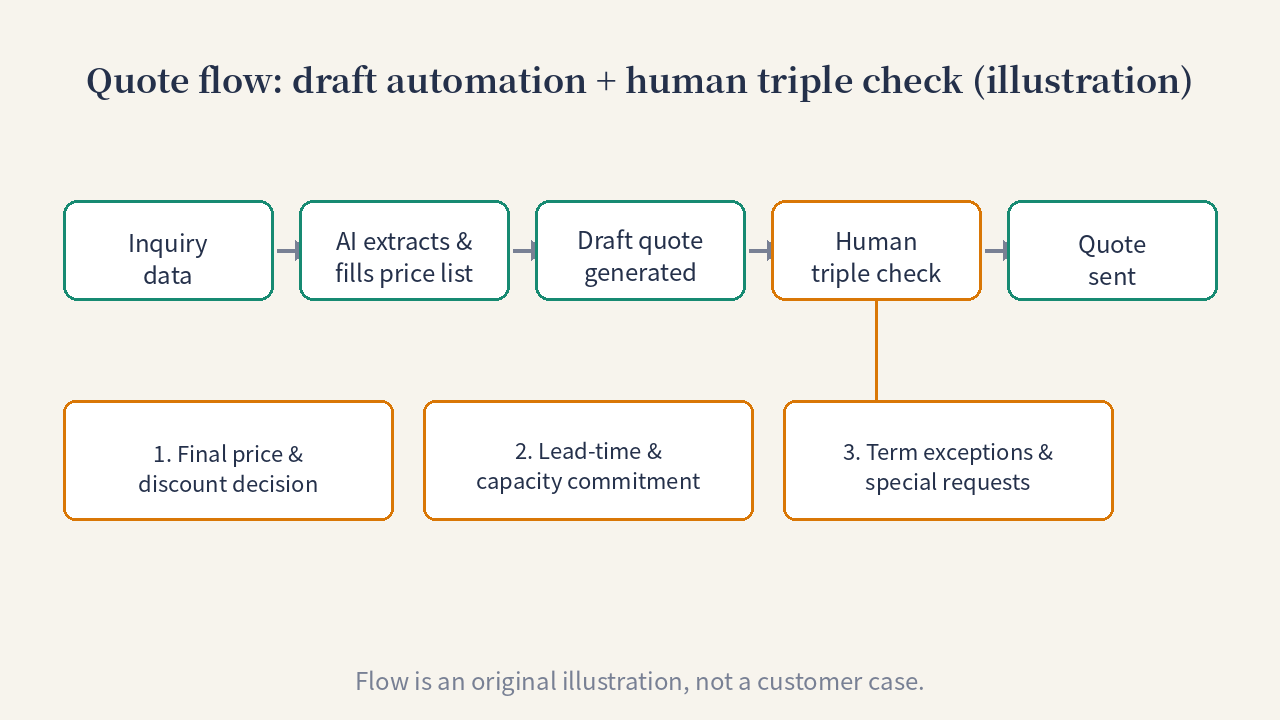
Flow is an original illustration, not a customer case.
1. Extract quote elements from inquiries
Model numbers, quantities, packing, delivery location, special customer requests — this information is scattered across emails and chat threads. Automation extracts it into a structured table first, which is the foundation for everything that follows. See the triage approach in small-scale inquiry pilot.
2. Match the price list and quote template
Apply the team’s reviewed price list and quote template to products, specifications and price ranges automatically. Only reviewed materials may be cited; anything not in the materials must not appear, be guessed, or be filled in.
3. Generate a draft quote
Assemble a complete draft quote that cites the price-list version and the rules that fired, and hold it at a “pending review” state — never sent automatically.
Three checks a human must keep
1. Final price and discount decisions
The price list gives the baseline; the price that actually goes out depends on customer tier, order volume and the competitive situation. Discount approval is a business decision — automation can lay out the options, but it cannot make the call.
2. Lead-time and capacity commitments
Lead-time commitments must be checked against current capacity and the production schedule. Factory loading changes daily, and automation’s data always lags — this commitment must be confirmed by someone who knows the shop floor.
3. Term exceptions and special requests
Payment terms, warranty terms, packing and certification requirements — customer exceptions are too varied for any template. Anything outside the template gets intercepted for human review, and only goes out after approval.
A safe rollout order
Recommended order: draft first, review next, expand scope last. Start with one product line or one or two sales reps, get draft accuracy and review efficiency running smoothly, then consider tiering the review gates (fast confirmation for standard items, detailed review for complex orders). This article describes a general method and makes no commitments about pricing, timelines or results; actual plans and fees are confirmed after a project evaluation.
We recommend starting with an inquiry workflow self-check (runs in the browser, produces a downloadable discussion brief), then assessing the team’s current quoting flow. To design a pilot for your team, add us on WeChat h335327552 (please note “四欄”) or WhatsApp +86 18395556720 — we align on the business scenario before talking about solutions.
Maintained by Chenfeng AI. Contact us through WeChat or WhatsApp to discuss a specific workflow.